

Why Does My Receivables Ageing Differ From My Balance Sheet?
When the receivables ageing does not match the balance sheet, the cause is usually two different measures, not a missing invoice. In this blog, we explain what the difference means and how to reconcile the receivables control account. We cover our team's diagnostic checks, a hypothetical correction and when to escalate to your accountant in Singapore.
What Does a Mismatch Between the Ageing and the Balance Sheet Actually Mean?
The reports may not be measuring the same thing. The ageing lists customer-level open items at a chosen as-at date. The balance sheet shows the receivables control account total, which may also be presented net of an impairment allowance. Before hunting for a missing invoice, confirm what each figure includes.
A receivables ageing report summarises customer open items by age. The balance-sheet trade receivables line comes from the control account in the general ledger. A difference between them is a prompt to reconcile, not proof that either report is broken.
Presentation can also widen the gap. Under impairment accounting, an expected credit loss allowance reduces the carrying amount of receivables on the balance sheet. The IFRS Foundation explains that expected credit loss accounting creates loss allowances on trade receivables, so a net balance-sheet line can legitimately sit below a gross ageing total. This is an interpretation of the standard's effect, so confirm the reporting framework and presentation that apply to your entity before treating the gap as an error.
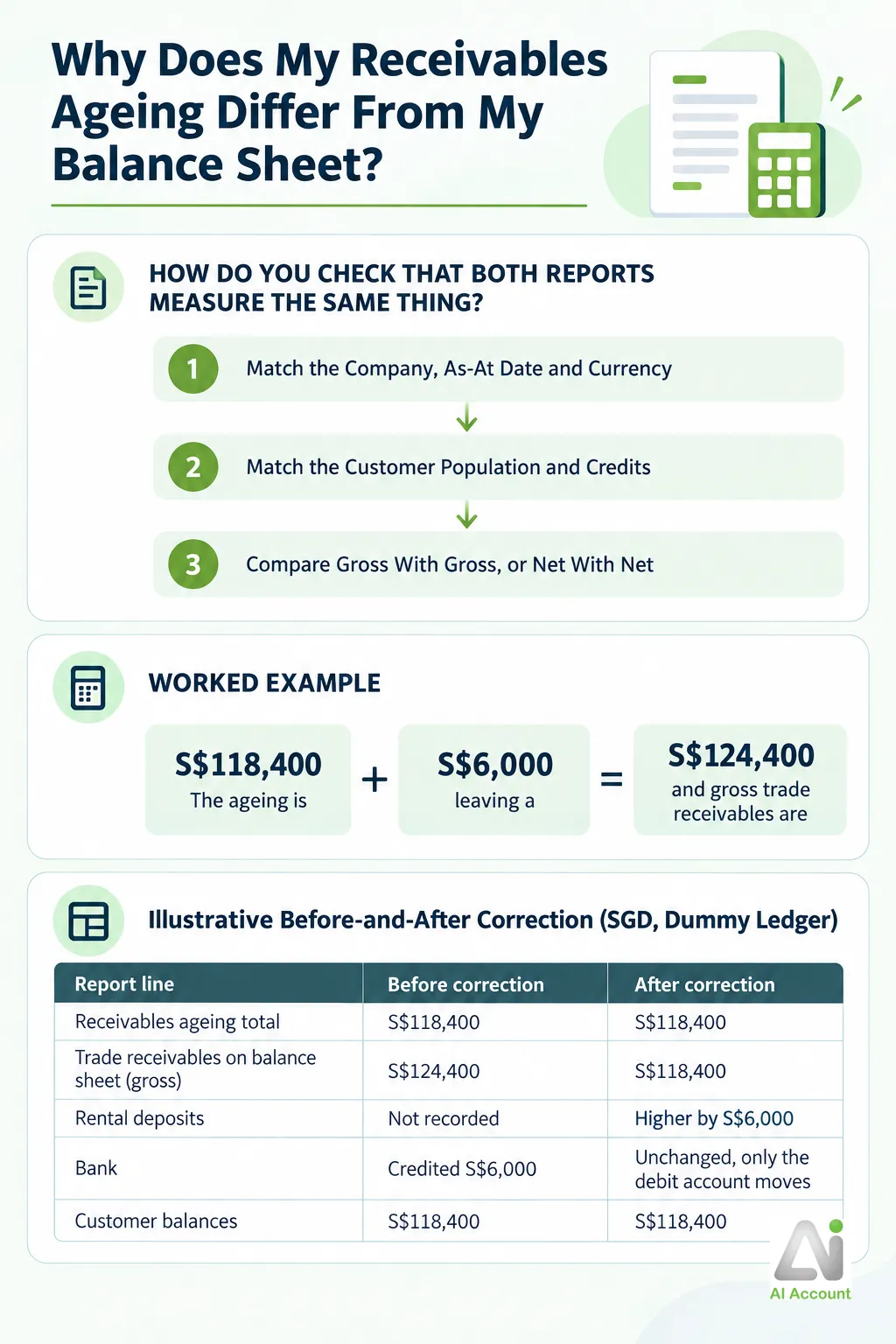
How Do You Check That Both Reports Measure the Same Thing?
Start by matching the scope of both reports before investigating any difference. Comparing a filtered customer report with a company-wide balance sheet is not a reconciliation. Whatever cloud accounting software you run, the three checks below come first.
Treat this sequence as a diagnostic routine to confirm against your own version's filters, not a fixed product procedure. Report options and filter behaviour vary between builds, so verify what each setting actually does before relying on the comparison.
1. Match the Company, As-At Date and Currency
Run both reports for the same entity, receivables accounts, historical as-at date and currency basis. Confirm the available filters and their effects in your version. A mid-month ageing compared with a month-end balance sheet will differ by design. In a multi-currency ledger, a revalued balance-sheet figure is not directly comparable with an ageing that shows invoice currency amounts.
2. Match the Customer Population and Credits
Include all customers, or the same filtered set, in both reports. Include customer credits and unallocated receipts consistently on each side. Changing the bucket basis may move items between buckets. Check that the report still includes the same population of outstanding items.
3. Compare Gross With Gross, or Net With Net
Compare gross trade receivables with a correspondingly scoped ageing total. If the balance sheet is presented net, investigate whether an impairment allowance or another presentation difference explains part of the gap before assuming a posting error. Confirm the applicable framework with your accountant, because presentation rules differ between reporting regimes.
Report Settings to Match Before Investigating a Difference
| Setting | What to confirm | Why it matters |
|---|---|---|
| As-at date | Both reports run to the same historical date | An ageing at a different cut-off will differ by design |
| Company and currency | Same entity, same currency basis | A revalued or different-company figure is not comparable |
| Customer population | All customers, or the same filtered set | Filtered reports exclude balances the balance sheet includes |
| Credits and receipts | Credits included consistently in both reports | Excluded credits shrink the ageing but not the control account |
| Presentation basis | Gross ageing against gross receivables | A net balance-sheet line sits below a gross ageing total |
How Do You Trace the Difference Through the Receivables Control Account?
Our team recommends tracing control-account movements and comparing them with customer-level open items. Look for entries that do not have matching customer detail, as well as differences in report scope.
AI Account's published guide describes General Ledger and General Ledger (Contact), including a currency filter and a contact-level statement export. These views can help compare account and customer detail. This guidance is based on the guide, not a test of a particular build. Confirm the available filters and navigation in your version.
1. Run the General Ledger for the Control Account
Select the trade receivables control account and run the period with its opening balance. Compare the opening balance with the previous ageing you retained. If the earlier totals agree, investigate subsequent movements, while checking for presentation or cutoff differences.
2. Look for Postings Without a Matching Customer Open Item
Scan movements for journals without corresponding customer open items. If your product permits a direct control-account posting without an open item, that could explain a difference. Confirm the posting route and report behaviour in your version; this is a diagnostic possibility, not a confirmed AI Account limitation.
3. Compare With the Contact-Level Detail
Compare contact-level detail with the ageing. Investigate any control-account movement that cannot be matched to customer detail.
Which Causes of an Ageing and Balance Sheet Mismatch Should You Check First?
Our team suggests starting with scope and dates, then checking postings, credits, currency and opening balances. This is a diagnostic sequence, not a ranking of observed causes. Confirm the available filters and their effects in your version.
1. Mismatched Dates or Report Scope
Different as-at dates, customer filters or entities can produce a mismatch. Rerun the reports on a comparable basis before tracing transactions.
2. Direct Control-Account Postings or Wrong Mappings
A direct journal or incorrect account mapping could affect the control account without a matching customer open item. This depends on the posting route and product configuration. Inspect the supporting documents before deciding whether to correct a classification.
3. Credits, Receipts and Allocation Treatment
An unallocated receipt is not automatically an error. If both reports include it consistently, it should not create a total difference. Check credit inclusion and how later allocations affect the historical cutoff. Do not assume a particular historical ageing behaviour without testing your version.
4. Foreign-Currency Valuation
If the balance sheet includes a revaluation but the ageing uses another basis, document a reconciliation bridge. AI Account's guide warns that a home-currency adjustment may not appear in a foreign-currency-filtered ledger. That does not establish how both reports compare in your build. Confirm the applicable accounting framework and avoid altering invoices solely to remove the bridge.
5. Migration and Opening-Balance Errors
Migration balances may have been posted to the control account without matching customer detail. Compare the first post-migration ageing with the migration support documents. Escalate unexplained opening balances to your accountant.
Common Causes of an Aged Receivables and General Ledger Difference
| Likely cause | Typical symptom | First check |
|---|---|---|
| Mismatched dates or scope | Large, clean round-number gap | Rerun both reports with identical settings |
| Direct posting or wrong mapping | Control account exceeds ageing; no customer owns the difference | Scan the general ledger for journals without customer references |
| Credits, receipts or allocations | Ageing shifts after receipts are entered | Compare credit inclusion and as-at allocation treatment |
| Foreign-currency valuation | Gap appears after month-end revaluation | Document a bridge between valuation bases |
| Migration or opening balances | Gap exists since the first post-migration close | Compare the opening ageing with migration documents |
How Should You Correct the Difference Once You Find It?
Correct the source classification when the evidence supports it. In the hypothetical example, suppose a journal debited trade receivables S$6,000 and credited bank without a customer reference. Suppose the deposit agreement and payment evidence identify a refundable office rental deposit. The debit would then belong in rental deposits rather than customer receivables.
If an auditable amendment is permitted, the proposed fix is to change the original debit account to rental deposits. Keep the amount, date and document references, and explain the correction. Otherwise, use a supported reversal and reposting workflow. Confirm the workflow and period status in your version, and consult your accountant before changing a locked period.
Under these assumptions, the control account would decrease by S$6,000 without changing customer balances. This is an expected effect, not a tested result. Reject an unexplained balancing journal that forces agreement without identifying the error. Retain the reports, correction and supporting documents as an audit trail.
AI Account's Premium Plan includes unlimited document uploads and ten years of data retention.
Illustrative Before-and-After Correction (SGD, Dummy Ledger)
| Report line | Before correction | After correction |
|---|---|---|
| Receivables ageing total | S$118,400 | S$118,400 |
| Trade receivables on balance sheet (gross) | S$124,400 | S$118,400 |
| Rental deposits | Not recorded | Higher by S$6,000 |
| Bank | Credited S$6,000 | Unchanged, only the debit account moves |
| Customer balances | S$118,400 | S$118,400 |
When Should You Stop Investigating and Escalate to Your Accountant?
Stop and escalate when the difference touches a closed period, tax, opening balances, or anything you cannot support with documents. A small amount is not permission to bypass these checks. The list below is practical guidance from our advisory team, not a legal requirement, and it has not yet been adopted as a formal firm procedure.
Escalate to your accountant when you see:
- a locked or previously signed-off period
- an opening-balance or migration difference
- a change affecting GST treatment, revenue recognition or a bad-debt decision
- unexplained foreign-currency or impairment entries
- missing supporting documents
- allocation changes that could distort customer collection statements
- evidence of deleted, duplicated or unauthorised transactions
- a proposed fix that moves bank without a real cash movement
Tax and reporting questions belong with the authorities' own rules. The Inland Revenue Authority of Singapore (IRAS) sets conditions for GST bad debt relief when a debt is written off, so a bad-debt decision is never a bookkeeper's solo call. The Accounting and Corporate Regulatory Authority (ACRA) identifies the Singapore Financial Reporting Standards frameworks that govern your financial statements, which is why impairment and presentation questions go to your accountant.
When you hand over, send the two reports, the account detail, the difference calculation, the candidate documents and your proposed correction. If you suspect the report behaviour itself, raise a product support case rather than forcing a journal. Filing deadlines add pressure, and if adjustments near filing season add to your stress about GST changes, a clean reconciliation done early is the antidote.
Done monthly, this discipline turns bookkeeping into effortless financial tracking rather than year-end firefighting. Reconcile the ageing with the control account at every close, and the mismatch never has time to grow.
A receivables ageing difference may involve report scope, presentation or classification. Our team recommends matching report settings first, then tracing control-account movements against customer detail. Correct a classification only when the documents support it. For currency or suspected historical-report differences, document the basis and escalate rather than forcing agreement.
Our team helps Singapore businesses and accounting firms with reconciliations in AI Account. The product guide describes General Ledger and General Ledger (Contact). Confirm ageing options and report behaviour in your version. We can also help you set up a monthly reconciliation process.
Get Help With Your Receivables Reconciliation
Speak to our team about running a clean ageing-to-balance-sheet reconciliation in AI Account, from matching report scope to documenting the correction.
